Patterning between two geodesic

This menu allows you to create a pattern using only two geodesic lines. Therefore, it is a very fast method to generate patterns, but is only valid for those cases in which the perimeter of the membrane does not include other points, because this method does not consider them. If we observe the figure on the…
Patterning by Perimeter

By defining perimeter of the pattern, we can generate a pattern more comfortably than the “by triangles” method. However, once the pattern is created, it is very important to check the triangularization that WinTess3 proposes in order to avoid incorrect patterns due to an error in data entry or malfunction of the program when it…

Patterning by Triangles

This phase involves of drawing triangles on the membrane, using only points on the perimeter and the geodesic lines. WinTess3 supports using any point on the mesh, but is completely inadvisable to do this, because that will possibly lead to erroneous or distorted patterns. It should take into account that these triangles, folded and placed in…

Multi-geodesic Lines

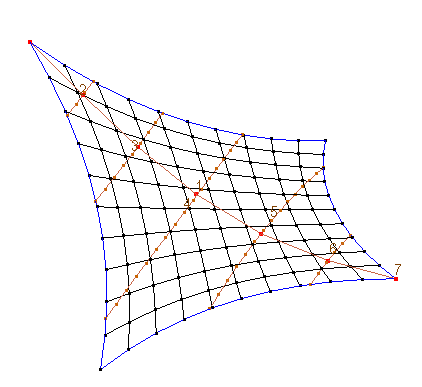
With this menu you can draw several geodesic line at the same time: Trans-auxiliarSelect an existing auxiliary line.For this purpose the segments making up the auxiliary creates a plane perpendicular to the auxiliary at each segment. These planes cut the membrane perimeter at two points (sometimes more). A geodesic between two correlating points is drawn. Trans-geodesicPerform the same process, but using the…

Geodesic Lines

In the section of general introduction to WinTess3, we have mentioned about geodesic lines. Why do we use geodesic lines? We could explain the reason why we use this type of lines in generating a pattern. However there are times that a picture (an example, in this case) is worth of a thousand words. Suppose that…

Drawing Geodesic Lines

First, as we mentioned in the section of the process, we set points on the perimeter that will serve as the ends of the geodesic lines.For this example, we will use the same decagonal membrane that we have generated in the section on geodesic lines. First, we will draw the first geodesic line between two high points of…

Menu: Geodesic

Create geodesic When pressed on this menu, a text, Create geodesic n,  is displayed at the top of the screen, where n is the number of the geodesics that are going to be created. The cursor changes to the selection finger to select the origin node of the geodesic. Once you have selected this node, a red line indicates to us that we…

Multi-geodesic Lines

The most common method of creating patterns on a membrane involves drawing geodesic lines on the membrane. Justification of the layout of the geodesic lines is beyond the scope of this text. Although the geodesic lines can be drawn freely to form patterns of any shape and position, it is common that the route of…