

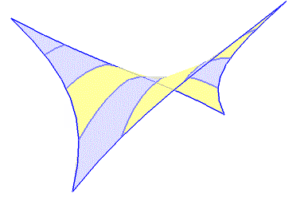
 Membranes that are commonly used in the pattern are not usually same on both sides. While it is true that there are identical membranes on both sides, the most common is not so. The reasons can be different:
- The membrane is bicolor: one color on each side.
- The membrane is coated on one side: lacquered, non-stick, …
- The membrane takes some treatment: screen printed, scratched, …
etc.
Thus, when we define a pattern, we must make it clear which one is which of the faces. And you really have to be careful because there are different reasons why a pattern can be created in reversed manner:
- The nodes have not been entered in the correct order (rotating clockwise).
- A symmetry has been applied .
- A pattern has been generated automatically (between two geodesic, for example) and the program failed to create the pattern with the proper orientation.
etc.
To avoid errors, WinTess3 shows the patterns with a different color for each face, using the same criterion of color that is used in the Elements: blue and yellow.

If a pattern is inverted we have to “reverse” it again so that it is in the correct position. To do this we will use the menu Patterns | Reverse. A reminder message indicates it is needed to click on the pattern and it changes color (its correct position).
